Chrony 时间同步服务
chrony
Chrony由两个主要组件组成:
- chronyd:这是一个后台守护进程,负责时间同步任务。
- chronyc:这是一个命令行界面工具,用户可以通过它与chronyd通信,监控和配置时间同步。
Chrony的配置文件位于/etc/chrony.conf。配置文件包括了时间服务器、日志选项、漂移文件等配置。
命令
- 查看当前同步状态:
chronyc tracking
这个命令显示了系统时钟的当前状态,包括偏移量、漂移速率和同步源的信息。
- 查看NTP源状态:
chronyc sources
该命令列出了所有配置的NTP源及其当前状态(如可达性、偏移量等)。
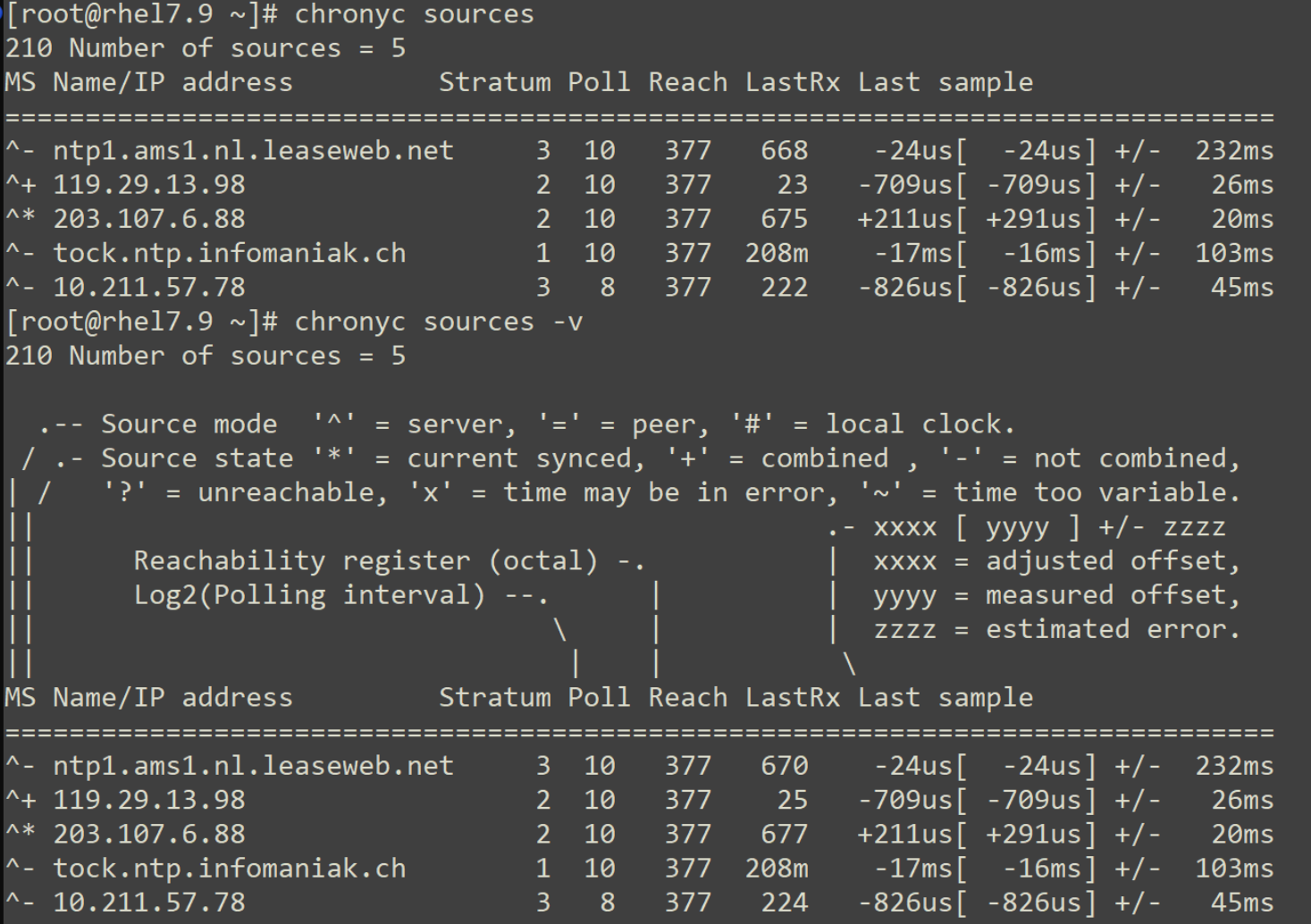
M - 这表示信号源的模式。^表示服务器,=表示对等方,#表示本地连接的参考时钟。
S - 此列指示源的状态。
* "*" 表示chronyd当前同步到的源。
* "+" 表示可接受的信号源,与选定的信号源组合在一起。
* "-" 表示被合并算法排除的可接受源。
* ? 指示已失去连接性或其数据包未通过所有测试的源。它也显示在启动时,直到从中至少收集了3个样本为止。
* x 表示chronyd认为是虚假行情的时钟(即,其时间与大多数其他来源不一致)。
* 〜 表示时间似乎具有太多可变性的来源。
Stratum - 这显示了来源的层,如其最近收到的样本中所报告的那样。层1表示一台具有本地连接的参考时钟的计算机。与第1层计算机同步的计算机位于第2层。与第2层计算机同步的计算机位于第3层,依此类推。
- 查看NTP源详细信息:
chronyc sourcestats -v
显示每个NTP源的详细统计信息,包括偏移量、延迟和抖动等。
- 强制立即重新同步时间:
chronyc makestep
强制系统时钟立即与NTP服务器同步,而不是逐步调整。
- 检查偏移量:
chronyc offset
显示当前时钟与NTP服务器之间的偏移量。
- 查看时间服务器响应时间:
chronyc ntpdata
显示NTP源的响应时间及其相关信息。
- 重启chronyd守护进程:
sudo systemctl restart chronyd
这是一个系统命令,但在配置或更改后经常使用,以确保新设置生效。
- 显示Chrony守护进程的日志:
sudo journalctl -u chronyd
查看chronyd服务的日志,以便诊断和解决问题。
授时中心
210.72.145.44 国家授时中心

ntp.aliyun.com 阿里云

s1a.time.edu.cn 北京邮电大学

s1b.time.edu.cn 清华大学

s1c.time.edu.cn 北京大学

s1d.time.edu.cn 东南大学

s1e.time.edu.cn 清华大学

s2a.time.edu.cn 清华大学

s2b.time.edu.cn 清华大学

s2c.time.edu.cn 北京邮电大学

s2d.time.edu.cn 西南地区网络中心

s2e.time.edu.cn 西北地区网络中心

s2f.time.edu.cn 东北地区网络中心

s2g.time.edu.cn 华东南地区网络中心

s2h.time.edu.cn 四川大学网络管理中心

s2j.time.edu.cn 大连理工大学网络中心

s2k.time.edu.cn CERNET桂林主节点

s2m.time.edu.cn 北京大学

ntp.sjtu.edu.cn 202.120.2.101 上海交通大学
配置文件
# 使用 pool.ntp.org 项目中的公共服务器。以server开,理论上想添加多少时间服务器都可以。

# Use public servers from the pool.ntp.org project.

# Please consider joining the pool (http://www.pool.ntp.org/join.html).

server 0.centos.pool.ntp.org iburst

server 1.centos.pool.ntp.org iburst

server 2.centos.pool.ntp.org iburst

server 3.centos.pool.ntp.org iburst


# 根据实际时间计算出服务器增减时间的比率,然后记录到一个文件中,在系统重启后为系统做出最佳时间补偿调整。

# Record the rate at which the system clock gains/losses time.

driftfile /var/lib/chrony/drift


# 如果系统时钟的偏移量大于1秒,则允许系统时钟在前三次更新中步进。

# Allow the system clock to be stepped in the first three updates if its offset is larger than 1 second.

makestep 1.0 3


# 启用实时时钟(RTC)的内核同步。

# Enable kernel synchronization of the real-time clock (RTC).
rtcsync


# 通过使用 hwtimestamp 指令启用硬件时间戳

# Enable hardware timestamping on all interfaces that support it.

#hwtimestamp *


# Increase the minimum number of selectable sources required to adjust the system clock.

#minsources 2


# 指定 NTP 客户端地址,以允许或拒绝连接到扮演时钟服务器的机器

# Allow NTP client access from local network.

#allow 192.168.0.0/16


# Serve time even if not synchronized to a time source.

#local stratum 10


# 指定包含 NTP 身份验证密钥的文件。

# Specify file containing keys for NTP authentication.

#keyfile /etc/chrony.keys


# 指定日志文件的目录。

# Specify directory for log files.

logdir /var/log/chrony


# 选择日志文件要记录的信息。

# Select which information is logged.

#log measurements statistics tracking